Today we bring you a small React knowledge pill that we discovered after hitting a problem in a project where we had concurrency in the frontend.
Context
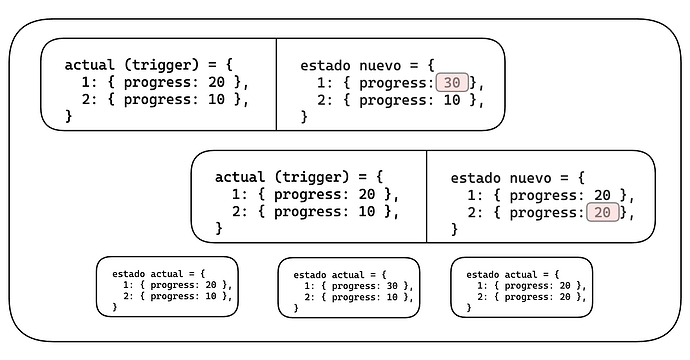
In our case, we had state stored inside a context. Several screens needed to read from it, and several “processes” were updating it at the same time. The problem is that, if those processes update the state concurrently, we can end up with inconsistencies because we need the previous state to avoid overwriting it with incorrect information.
Here is a repository where, if you run it and click the start button, you can see the inconsistency that appears when the state is updated in the conventional way, even if we try to use the previous state value inside setState. It also includes the version that applies the solution described below.
Problem
The main cause is that React designed setState to be asynchronous. In other words, the event is triggered at a given moment, but we do not know exactly when the update is applied. Because of that, we cannot guarantee that the “previous state” will remain unchanged from the moment the update is scheduled until the state is finally written.
Solution
Since the problem is that updates are asynchronous, we need a mechanism that either makes them behave synchronously or makes each update depend on the previous one.
Without deep React knowledge, the first idea that usually comes to mind is using the state value we already have in scope to overwrite it. We quickly realize that this does not actually solve the issue.
const [stateValue, setStateValue] = React.useState({})

// This does NOT guarantee that the state value is the real previous one.
const updateStateWithoutPreviousStateValue = (newStateValue) => {
  setStateValue({ ...stateValue, ...newStateValue })
}
After digging through the web, we reached the official React documentation, which shows how to make a state change always depend on the previous state. Not the value exposed in our variable, but the latest committed state update. The solution is as simple as passing a function to setState, where the function receives the previous state as its argument.
const [stateValue, setStateValue] = React.useState({})

// This DOES guarantee that we are using the real previous state.
const updateStateBasedOnPreviousStateValue = (newStateValue) => {
  setStateValue((previousStateValue) => {
    return { ...previousStateValue, ...newStateValue }
  })
}
In the end, this small challenge helped us better understand how React works, face a slightly different situation, and learn from it.